Download Time Calculator
File size + speed + efficiency
Estimated time
00:07:24
7 minutes, 24 seconds
Effective speed
180 Mbps (22.5 MB/s)
At 100% efficiency
00:06:40
Data to transfer
10 GB (80,000,000,000 bits)
A download time calculator that gives realistic planning numbers
A download time calculator helps you answer one practical question fast: “How long will this file take on my connection?” This download time calculator is built for day-to-day planning, not lab-only conditions. Enter a file size, enter your line speed, and then set network efficiency to match real conditions. Your estimated transfer time updates instantly. If you are downloading a game, syncing design assets, pulling a VM image, or preparing offline video files before a trip, this download time calculator keeps expectations clear.
Many users search for a download speed calculator or an internet download time calculator because ISP speeds and actual download time rarely match. That gap is normal. Protocol overhead, Wi-Fi interference, shared bandwidth, VPN tunneling, CDN routing, and server-side limits can all reduce practical throughput. This download time calculator handles that reality with a simple efficiency control, so your estimate reflects what usually happens in real networks.
How this download time calculator computes transfer time
The math is direct. First, the download time calculator converts file size to bits. Next, it converts your connection unit (Mbps, Gbps, MB/s, and more) into bits per second. Then it multiplies line speed by network efficiency to get effective transfer speed. Finally, it divides total bits by effective bits per second. The same file download time calculator logic works for tiny patches and multi-terabyte archives.
If you have used another download time calculator, you may have noticed wildly different results. The main reason is whether the tool models overhead. A raw download speed calculator that assumes 100% efficiency can be too optimistic, especially on busy Wi-Fi or shared office links. This download time calculator shows both your realistic estimate and the “perfect line rate” estimate so you can compare ideal versus practical timing in one place.
When to use a download time calculator
Use this download time calculator when downloads affect schedules, launches, or travel prep. Teams use a download time calculator before software releases to estimate deployment windows. Video editors use a file download time calculator to plan media sync across remote collaborators. Students use a download speed calculator to estimate how long course bundles will take before class. IT admins use an internet download time calculator to stage images before maintenance windows.
This tool is also useful for personal planning: large game installs, cloud backups, offline maps, and 4K media packs. A quick download time calculator check can tell you whether to start now, queue overnight, or switch to ethernet first. In practice, that can save hours of waiting and reduce failed transfer retries.
MB/s vs Mbps in any download time calculator
Unit confusion is one of the biggest reasons estimates look wrong. Most internet plans are shown in Mbps (megabits per second), while many apps display MB/s (megabytes per second). Because one byte is eight bits, 200 Mbps is not 200 MB/s. A good download time calculator must normalize units correctly. This download speed calculator supports both bit-based and byte-based speed units so you can match what your ISP page and download client actually show.
Tips for better estimates from a file download time calculator
- Test one real download first, then set efficiency to match that observed performance.
- Use ethernet if available; Wi-Fi variance can shift a download time calculator result a lot.
- Run fewer concurrent streams when accurate transfer windows matter.
- For mission-critical transfers, plan with the realistic estimate plus a buffer.
No download time calculator can predict sudden ISP congestion or server throttling with perfect precision. But with correct units and sensible efficiency, a file download time calculator gives strong planning-grade estimates. That is exactly what this page is designed to do.
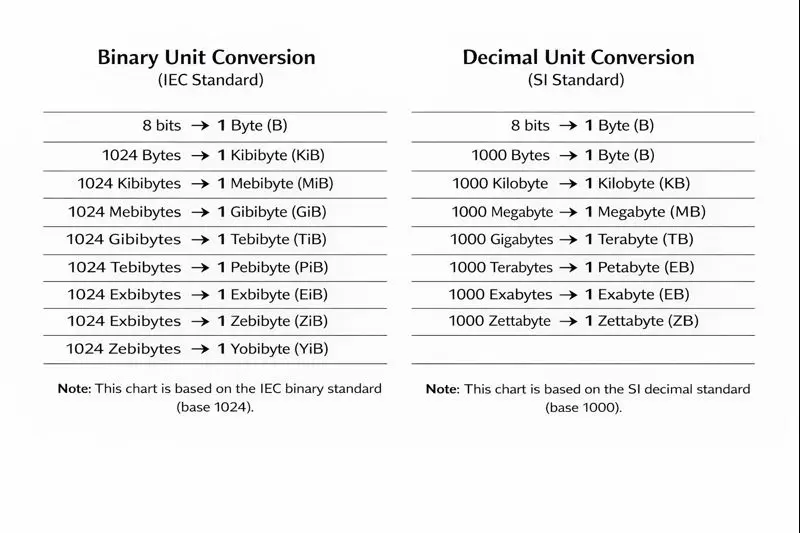
Binary Byte Conversion Chart
Download time calculator FAQ
How do I calculate download time for a 100 GB file at 300 Mbps?
Enter 100 GB, select 300 Mbps, then set your expected efficiency. This download time calculator instantly returns a practical estimate and a perfect-line benchmark.
Why does my download time calculator result differ from the app store timer?
App stores often include server throttling, decompression, verification, and post-download install steps. This file download time calculator models transfer time only.
Should I use Mbps or MB/s in a download speed calculator?
Use whichever unit your source displays. This internet download time calculator supports both and converts accurately behind the scenes.
What efficiency should I use in a Wi-Fi download time calculator?
A common planning range is 60% to 90%. Start around 75%, compare with real transfers, then adjust your download time calculator profile.
Can I use this calculator for cloud backup restores and ISO images?
Yes. This download time calculator works for any transfer where file size and link speed are known, including restores, installers, and archive bundles.
Last updated: February 3, 2026